## You Got a .md File
Markdown Reader for Mac
A colleague sent you a .md file. Maybe it came from GitHub, an Obsidian export, or a project handoff. You double-clicked it and got a wall of # symbols and ** characters. Now what?
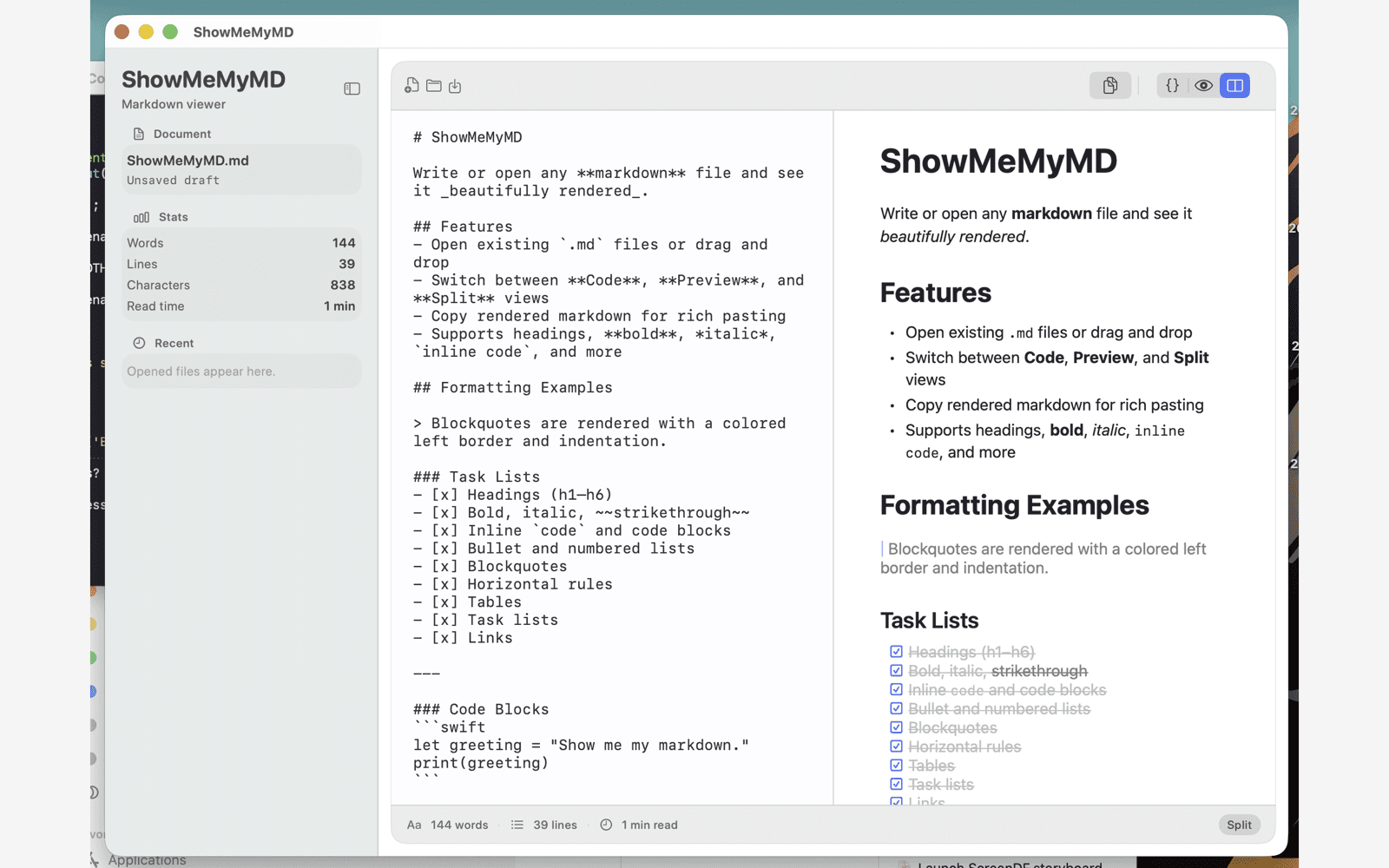
ShowMeMyMD is a native macOS markdown reader that opens any .md file and renders it beautifully — instantly. No code editor. No browser. No learning curve.
Recent files
Reopen Markdown files from the sidebar after relaunch.
Safe edits
Get a save prompt before replacing unsaved changes.
Rich copy
Copy rendered text, Markdown source, or HTML.
## What Is a .md File?
Plain text with formatting built in
A .md file is a Markdown file — a simple text document that uses symbols like # for headings and ** for bold text. Think of it like a Word document, but simpler and universal. Developers love it, but anyone can read one — with the right app.
You’ll find .md files everywhere: GitHub README files, Obsidian note exports, project documentation, API guides, meeting notes, and technical specifications. They’re the universal format for structured text — and all you need is a proper reader to make sense of them.
Want the full explanation? Read our guide to .md files. Or jump straight to our Markdown cheat sheet.
## The Problem
TextEdit makes Markdown unreadable
Double-clicking a .md file on Mac opens it in TextEdit by default. Instead of a nicely formatted document, you see raw syntax — hash marks, asterisks, brackets, and dashes everywhere. The content is there, but it looks like code.
What TextEdit shows you
# Project Overview
## Getting Started
**Important:** Follow these steps...
- Step one: install the thing
- Step two: configure the `settings.json`
You don’t need a code editor. You don’t need to learn Markdown syntax. You just need to read the document. Learn how to open .md files on Mac the right way, or set ShowMeMyMD as your default .md app.
## The Solution
ShowMeMyMD turns .md files into readable documents
ShowMeMyMD is like Preview.app, but for Markdown. Drop in a .md file and it renders instantly — headings, bold text, lists, code blocks, tables, all formatted exactly as the author intended. No setup. No learning curve.
Set it as your default .md app once, and every Markdown file you open will just look right. Built with native SwiftUI — not Electron — so it launches instantly and feels like a real Mac app.
## Built for Reading
Features designed for comfortable reading
ShowMeMyMD is purpose-built for people who need to read Markdown, not write code.
01
Sepia Theme
A warm, paper-like reading experience that’s easy on the eyes — especially for long documents. Like reading a book, not staring at a screen. Plus three more themes: System, Nord, and Solarized.
02
Clean Typography
Proper font sizing, line spacing, and margins that make long documents a pleasure to read. Headings, lists, and code blocks are all visually distinct.
03
Table of Contents
Long document? The built-in Table of Contents lets you jump to any section instantly. Great for project documentation, meeting notes, and guides.
04
Word Count & Read Time
See word count, line count, and estimated reading time at a glance. Know exactly how long that README or project brief will take to get through.
05
Syntax Highlighting
Over 20 programming languages highlighted in fenced code blocks. When you’re reading technical docs, code samples look exactly as the author intended.
06
GitHub Callouts
Full support for GitHub-style callouts — note, tip, important, warning, and caution blocks render with proper icons and colors.
## Who It’s For
A markdown reader for everyone, not just developers
You don’t need to be a programmer to encounter .md files. Here’s who uses ShowMeMyMD every day:
Project Managers & Team Leads
Your dev team sends project docs, specs, and READMEs as .md files. Now you can read them without asking someone to convert to PDF first.
Obsidian & PKM Users
Exported notes from Obsidian, Logseq, or other knowledge management tools are Markdown files. ShowMeMyMD lets you view Obsidian notes outside the app with proper formatting.
Technical Writers & Documentation Teams
Review Markdown drafts with proper rendering before publishing. See exactly how headings, tables, code blocks, and callouts will look. ShowMeMyMD is ideal for technical writers working with Markdown.
Anyone Who Gets Sent a .md File
A contractor delivered a README.md. A student submitted notes in Markdown. Your GitHub repo has documentation you need to read. ShowMeMyMD makes all of it instantly readable.
## Why Native?
A real Mac app, not a web wrapper
Many Markdown tools are Electron apps — web browsers disguised as desktop software. They use hundreds of megabytes of RAM and take seconds to launch. ShowMeMyMD is different.
Built with native SwiftUI, ShowMeMyMDlaunches in under a second, uses minimal memory, and runs natively on Apple Silicon without Rosetta. It respects your Mac’s appearance settings, supports standard keyboard shortcuts, and integrates with Finder just like any other native macOS app.
See how it compares to popular alternatives: vs VS Code · vs Typora · vs MacDown · vs Marked 2
## Copy & Share
Share Markdown without the syntax
Need to share the content of a .md file with someone who doesn’t use Markdown? Copy it as rich text with one click and paste it into emails, Google Docs, Slack, Notion, or any app that accepts formatted text. Headings, bold, lists, and links all come through perfectly.
No more copying raw syntax. No more reformatting by hand.
Popular use cases: Paste Markdown into Gmail · Markdown to rich text email · Markdown to Outlook
## FAQ
Frequently Asked Questions
How do I open a .md file on Mac?
Download ShowMeMyMD from the Mac App Store, then double-click any .md file. To make it your permanent default, right-click a .md file in Finder, select Get Info, choose ShowMeMyMD in the Open With dropdown, and click Change All. Every .md file will now open beautifully rendered.
What is a .md file?
A .md file is a Markdown file — a plain text document that uses simple symbols like # for headings and ** for bold text. Markdown is used everywhere: GitHub READMEs, Obsidian notes, project documentation, and technical writing. With a markdown reader like ShowMeMyMD, these files render into beautifully formatted documents.
Do I need to know Markdown syntax to use ShowMeMyMD?
No. ShowMeMyMD renders Markdown into formatted text automatically. You see headings, bold text, lists, tables, and code blocks — not raw symbols. It is designed for people who need to read .md files, not write code.
Can I copy the formatted content to paste into emails or Google Docs?
Yes. ShowMeMyMD lets you copy rendered Markdown as rich text with one click. Paste it into Gmail, Google Docs, Slack, Notion, or any app that accepts formatted text. Headings, bold, lists, and links all come through perfectly.
Does ShowMeMyMD work on Apple Silicon Macs?
Yes. ShowMeMyMD is built with native SwiftUI and runs natively on both Apple Silicon and Intel Macs. No Rosetta required. It launches instantly and uses minimal system resources.
Is ShowMeMyMD a subscription?
No. ShowMeMyMD is a one-time purchase of $2.99 from the Mac App Store. No subscription, no account, no telemetry. Buy it once and use it forever.
What Markdown features does it support?
ShowMeMyMD supports GitHub Flavored Markdown (GFM) including tables, task lists, fenced code blocks with syntax highlighting for 20+ languages, strikethrough, and GitHub-style callouts (note, tip, important, warning, caution).
## Learn More
Explore more about Markdown on Mac
What is a .md file? — The complete beginner’s guide to Markdown files
How to open .md files on Mac — Step-by-step guide with screenshots
Markdown Viewer for Mac — Full feature overview of ShowMeMyMD
Markdown Preview for Mac — Live preview with split view and sync scrolling
Preview GitHub README locally — See your README before you push
Best Markdown Editor for Mac — Why ShowMeMyMD is the editor Mac needs
Compare Markdown apps — See how ShowMeMyMD stacks up against alternatives
Set default .md app on Mac — Make every .md file open in ShowMeMyMD
Just want to read a .md file?
$2.99. One-time purchase. No subscription. No code editor required.
Download on theMac App Store$2.99 · macOS 14+